In the rapidly evolving landscape of web browsers, Comet AI Browser emerges as a bold innovation. It’s not just about rendering web pages—it’s about thinking and acting on your behalf. Developed by Perplexity AI, Comet blends a familiar Chromium foundation with deep artificial intelligence integration, redefining how users interact with the internet.
What Is Comet AI Browser?
Comet AI Browser is an AI-powered web browser built to make browsing more intelligent, efficient, and autonomous. It goes beyond simple navigation—Comet can interpret, summarize, act, and even make decisions within your browsing experience.
Key Features
- Built on the Chromium engine, ensuring compatibility with Chrome extensions and a familiar interface.
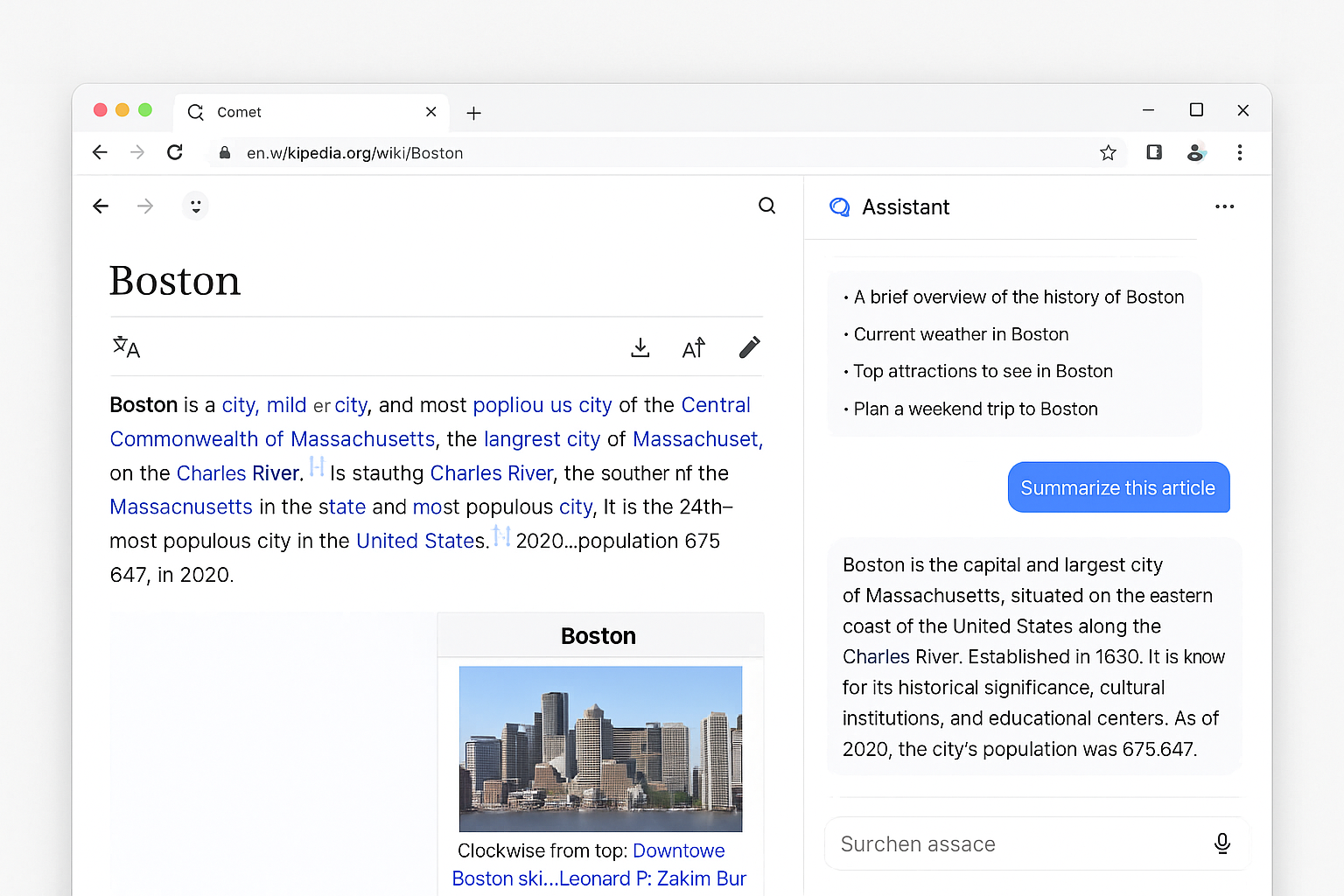
- Equipped with a built-in AI assistant that can understand and act on webpage content.
- Designed to help users achieve goals—from research and shopping to booking and writing—without switching tabs endlessly.
- Developed with a privacy-first approach, minimizing external data sharing and prioritizing local processing.
Unlike other browsers that simply integrate an AI sidebar, Comet treats AI as its core foundation, not an add-on.
How Comet Works
1. Intelligent Context Understanding
When you open a webpage, Comet can instantly understand what you’re looking at. You can ask it to:
- Summarize articles or long documents.
- Translate foreign languages instantly.
- Explain technical or complex terms.
- Highlight key ideas or generate quick overviews.
Comet’s AI actively interprets context, helping you focus on what matters instead of wasting time scrolling or scanning pages.
2. Agentic Task Automation
Comet takes browsing a step further with agentic automation—meaning it can take actions based on your requests.
Examples include:
- Navigating multi-step websites automatically (like booking tickets or filling forms).
- Comparing products across multiple sites and summarizing differences.
- Extracting key data or compiling information from multiple tabs into one summary.
- Managing research tasks, organizing tabs, and even scheduling tasks from online sources.
This level of automation makes Comet more than just a browser—it’s your digital co-pilot.
3. Familiar Yet Smarter Interface
Because Comet is Chromium-based, users will find the layout instantly recognizable. You can still use:
- Bookmarks, history, extensions, and autofill tools you already rely on.
- Password managers such as 1Password or built-in secure autofill.
- Clean UI elements similar to Chrome but enhanced with a real-time AI assistant on the side.
This combination of familiarity and innovation makes transitioning to Comet almost effortless.
Why Comet AI Browser Stands Out
Workflow Instead of Tabs
Comet is designed to think in terms of workflows, not just pages. Instead of managing dozens of open tabs, you can simply say, “Plan a 3-day trip to New York.” Comet will search, compare hotels, find flights, and even draft an itinerary—all while keeping everything organized in a single workspace.
Conversational Browsing
Forget typing formal search queries. You can speak or write naturally, such as “Find me recent reviews of the iPhone 16 and summarize the pros and cons.” Comet understands your intent, retrieves results, and gives you a concise answer without you needing to click through multiple pages.
Privacy-First Approach
Comet places heavy emphasis on data security and user privacy. Your browsing data is not used to train external models. Most AI processes run locally, reducing the risk of leaks and ensuring that sensitive information remains private.
Extensibility
Since Comet is Chromium-based, it supports nearly all Chrome extensions. You don’t lose your favorite productivity or security tools when switching browsers. It’s AI-powered without sacrificing flexibility.
Limitations and Challenges
While Comet is impressive, it’s not without flaws. Understanding its limits helps users make informed choices.
1. Early Development Stage
Comet is still in its early rollout phase. Some features are in beta and may show occasional bugs or performance issues. Initially, it was limited to Perplexity’s premium subscribers, though availability has now expanded.
2. Security Risks
Comet’s ability to act autonomously introduces new security challenges. Because the AI can interpret and execute commands from web content, it’s vulnerable to prompt injection—where malicious sites trick the AI into performing unintended actions. Although Perplexity is working to strengthen safeguards, users must remain cautious and review actions before confirming them.
3. Dependence on AI Judgment
While Comet’s automation is powerful, it can sometimes lead to overreliance on AI. Decisions involving nuance, skepticism, or personal context—like financial transactions or privacy-sensitive actions—still require human oversight.
4. Resource Usage
Continuous AI processing demands higher computational resources. Users on lower-end devices may experience lag, higher memory use, or reduced battery life.
5. Competitive Landscape
Comet enters a market crowded with AI-integrated browsers such as Chrome with Gemini, Microsoft Edge with Copilot, and emerging AI-first browsers like Neon and Arc Search. To stand out, Comet must continue innovating in usability, security, and reliability.
Ideal Use Cases for Comet AI Browser
Comet excels in certain scenarios more than others:
- Academic Research – Perfect for summarizing papers, comparing sources, and extracting insights quickly.
- Content Creation – Ideal for writers or marketers who want summaries, references, and idea generation on the fly.
- Productivity Workflows – Great for automating repetitive tasks such as filling forms or organizing tabs.
- Exploratory Learning – Excellent for exploring new topics and asking layered questions in real time.
However, for high-security contexts like banking or confidential business transactions, traditional browsers may still be safer.
Tips to Use Comet Effectively
- Start Small – Begin with research or low-risk tasks to get comfortable with Comet’s AI behavior.
- Review AI Actions – Always confirm before letting the browser execute automated steps.
- Activate Privacy Modes – Use stricter settings when browsing unknown sites.
- Retain Extensions – Continue using security extensions and password managers for added protection.
- Stay Updated – Regularly install updates since security patches and performance enhancements are frequent.
The Future of Comet AI Browser
Comet’s arrival signals a new chapter in how we experience the web. The next steps likely include:
- Improved security frameworks to combat AI-specific threats.
- Enhanced context memory, allowing the browser to remember ongoing goals and tasks.
- Cross-device synchronization for seamless transitions between desktop and mobile.
- Expanding integrations with productivity apps, calendars, and email clients.
If Perplexity continues to refine its technology responsibly, Comet could redefine browsing by turning the browser into a proactive partner—one that understands, assists, and acts with human-like intelligence.
Key Takeaways
- Comet AI Browser is an AI-powered, agentic web browser by Perplexity AI that blends browsing with automation and intelligence.
- It can understand content, summarize information, and execute actions within your browsing environment.
- Built on Chromium, it retains compatibility with Chrome extensions and a familiar interface.
- Its privacy-first approach and AI-driven workflow system make it a standout among next-generation browsers.
- Challenges remain around security, reliability, and performance, but its potential is vast.
Comet represents the future of browsing—one where AI doesn’t just assist your search, but actually helps you get things done. Experience the future of browsing with Comet AI Browser by Perplexity — your intelligent assistant that searches, thinks, and acts for you. Try it now using my link!